


Some companies need to ensure that certain invoices are paid from certain bank accounts. For example:
- A non-profit might use one account for operating expenses and another for grant payments.
- A property management company might pay invoices from different accounts depending on the property.
To achieve this, when you create a purchase invoice, you can enter a Pay-From bank account on the invoice. Then, when creating a payment, use Suggest Vendor Payments to automatically filter for invoices for the bank account you are paying from.
If you have a preferred bank account, you can assign it in User Setup. You can override the assigned bank account on individual invoices if needed, otherwise, the default will apply automatically.
To assign purchase invoices by bank account:
- Go to User Setup.
- In the Pay-From Bank Account column, select the bank account to assign for each user.

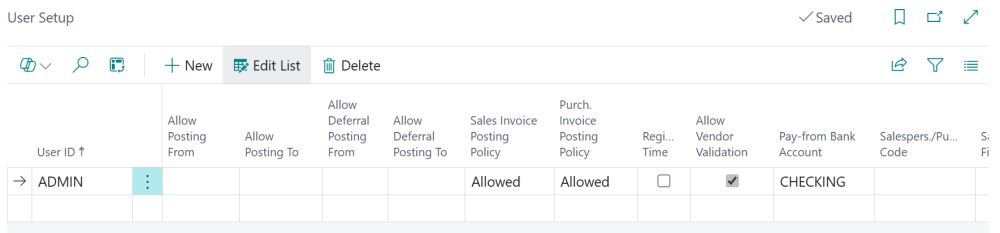
Once you have set up a default pay-from bank account, see the topic on paying purchase invoices by bank account for the next steps.
Need more help with this?
We value your input. Let us know which features you want to see in our products.