


A Build ID allows you to save rules for selecting purchase invoices for payment. You then assign the Build IDs to Process Templates to build numerous batches with different criteria in one streamlined process in Action Board.
- A Process Template is a collection of Build IDs combined with rules on how to create the physical payments, across multiple companies.
- Action Board works with Multi-Entity Management (MEM) by Binary Stream®, so you can include entity information in your Build IDs.
Once you have your Build IDs, you will create a Process Template to assign these rules to companies and bank accounts in any number of combinations to create your fully automated process.
There is no limit to how many Build IDs you create—build one for each payment scenario. Follow the steps below to create a Build ID:
- Go to Mekorma Build IDs.
- Click New.

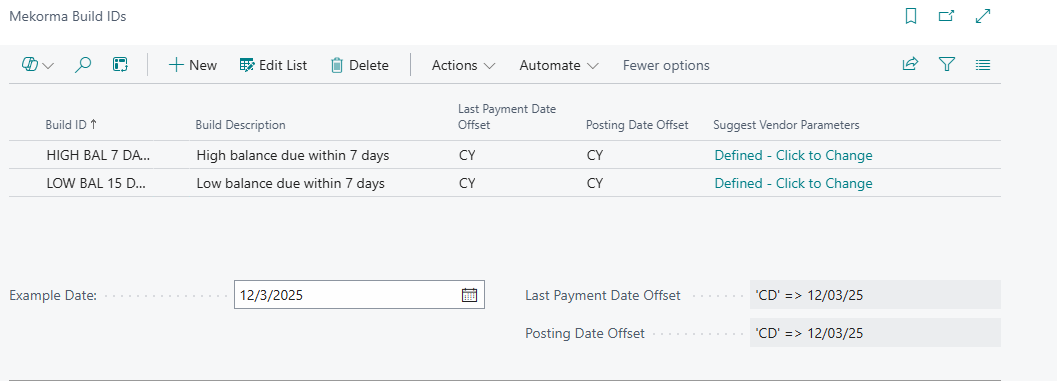
- Enter a name for the Build ID. After you leave the Build ID name field, the Suggest Vendor Payments window opens.
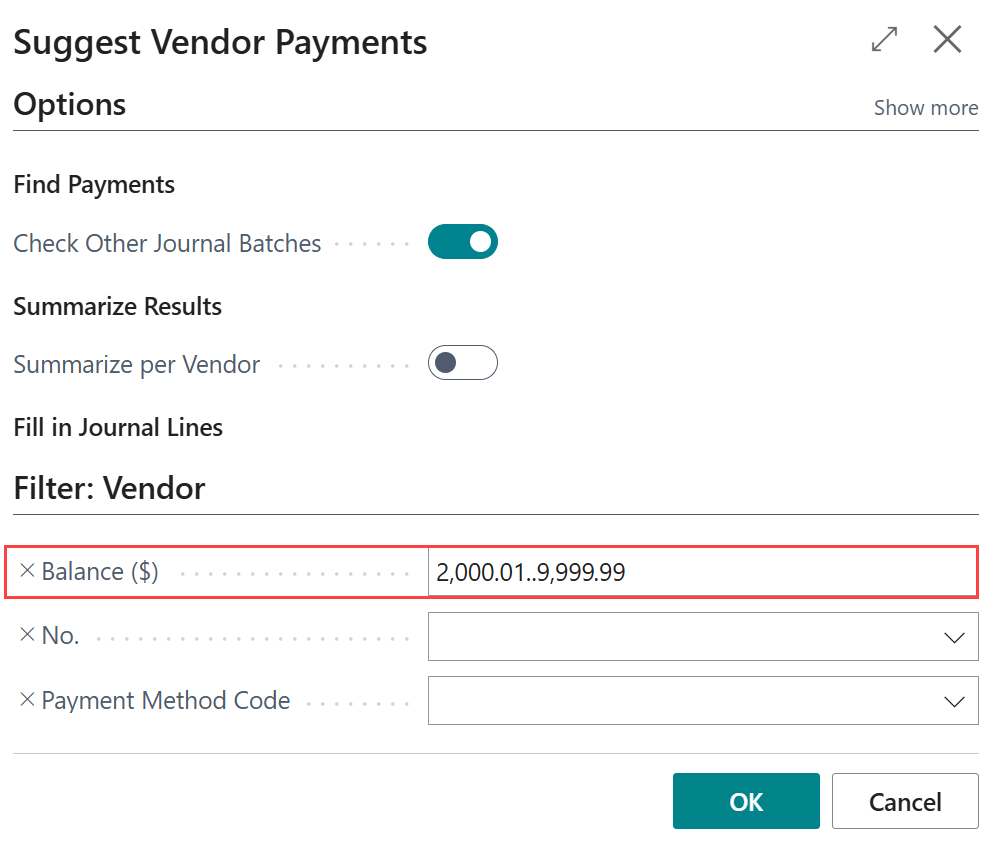
- In the Suggest Vendor Payments window, define the options and filters for finding invoices.
Action Board builds using Business Central’s Suggest Vendor Payments page, which these selections mimic. These can be changed by clicking in the Suggest Vendor Parameters column.
Note: When using MEM, MEM-specific options are available. Suggested Vendor Payment Filter is blocked because Mekorma applies this automatically while building a batch.
Example: For this Build ID, the only option included is a balance range between $2,000.01 and $9,999.99.
- Set date offsets:
- Last Payment Date Offset: Defines the cutoff date for capturing invoices.
- Posting Date Offset: Adjusts the posting date relative to the base date.
The example date field shows how these offsets affect dates in real time.
- The Build ID saves automatically when you leave the record.
- Repeat these steps to create additional Build IDs.
To edit an existing Build ID
- Click Edit List.
- Edit the Build ID as needed.
Additional resources
Business Central Criteria Filters – Learn about sorting, searching, and filtering data.
Business Central Formula Field – Learn about DateFormula data types.
Creating a Process Template – How to specify the payment batches that you want to build.
Need more help with this?
We value your input. Let us know which features you want to see in our products.