


Mekorma’s Assign by Bank Account assists in paying purchase invoices from the correct bank account, making payments simpler and more accurate. Before paying with a default bank account, configure the pay-from bank account. Assigning purchase invoices by bank account is compatible with Action Board.
Reviewing the pay-from bank account on a purchase invoice
After creating a new purchase invoice, the Pay-From Bank Account field (in the Shipping and Payment section) shows the defaulted bank account. You can change the bank account for a specific purchase invoice here—otherwise the default pay-from bank account will always be used.

Note: The pay-from bank account will only be defaulted to newly created purchase invoices. All previously created purchase invoices will be unaffected.
Paying with pay-from bank accounts
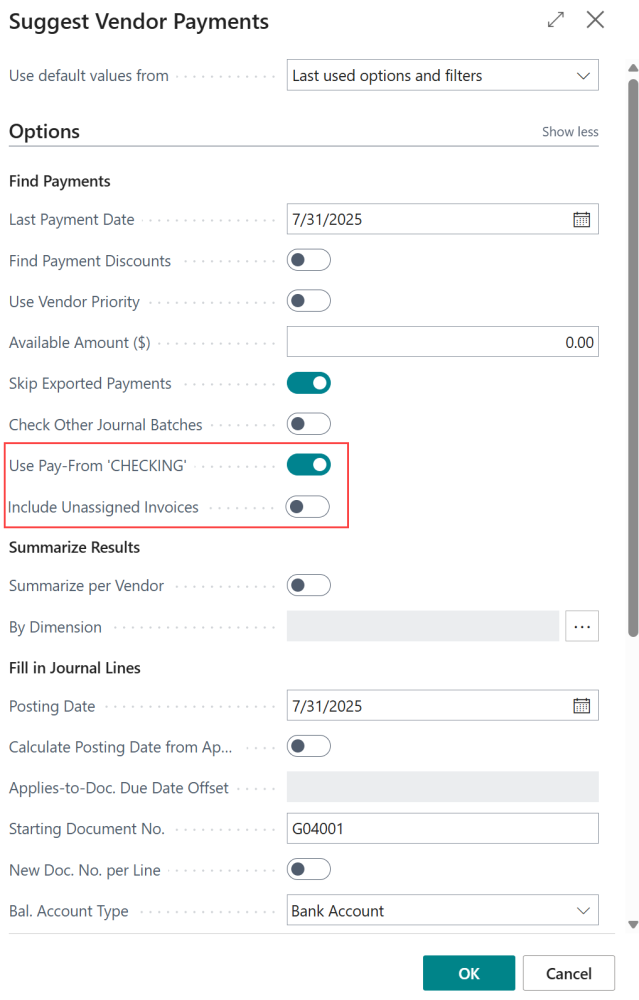
When you are ready to pay the posted purchase invoice(s), follow standard Business Central payment creation steps. In Suggest Vendor Payments, there are two additional fields that help you refine how you can filter invoices for payment:
- Use Pay-From ‘[bank account]’: This field shows the bank account that has been selected as the pay-from bank account. When enabled, it filters purchase invoices for that bank account. If disabled, no filtering will be applied.
- Include Unassigned Invoices: This field helps clear out unpaid invoices. When enabled, it will add to your batch any unpaid and unassigned purchase invoice, alongside invoices already assigned a pay-from bank account.
Note: If Bal. Account Type is set to anything other than Bank Account, these buttons will be deactivated and hidden.
For example, you have 9 invoices: 2 are unassigned, 3 are assigned to CHECKING and 4 are assigned to SAVINGS. The following scenarios are possible when paying invoices with assigned bank account filters:
| Filter(s) applied | Invoices selected | Breakdown |
|---|---|---|
| No filter | 9 | All invoices (standard BC) |
| CHECKING | 3 | 3 from CHECKING |
| SAVINGS | 4 | 4 from SAVINGS |
| CHECKING + Unassigned | 5 | 3 from CHECKING, 2 Unassigned |
| SAVINGS + Unassigned | 6 | 4 from SAVINGS, 2 Unassigned |
Changing a bank account after posting
In the event that an invoice is accidentally assigned the wrong bank account, you can still pay it with the correct bank account. Simply add the invoice to a payment line, then update the Bal. Account No. field to the correct bank account before submitting the batch as normal.
Need more help with this?
We value your input. Let us know which features you want to see in our products.