


On the bank account card, select your check reports in the Mekorma Settings. The following check report options are available:
- Mekorma Super Check: Required to use Mekorma’s advanced print and check features.
- Mekorma Electronic Signatures check reports: Obsolete; only legacy Electronic Signatures users should use them.
- Business Central’s standard check reports: Do not support Mekorma’s advanced print and check features.
The screenshot below shows all available check reports as they appear in Business Central. Only the last option, Mekorma Super Check, should be selected; the first four reports are obsolete.
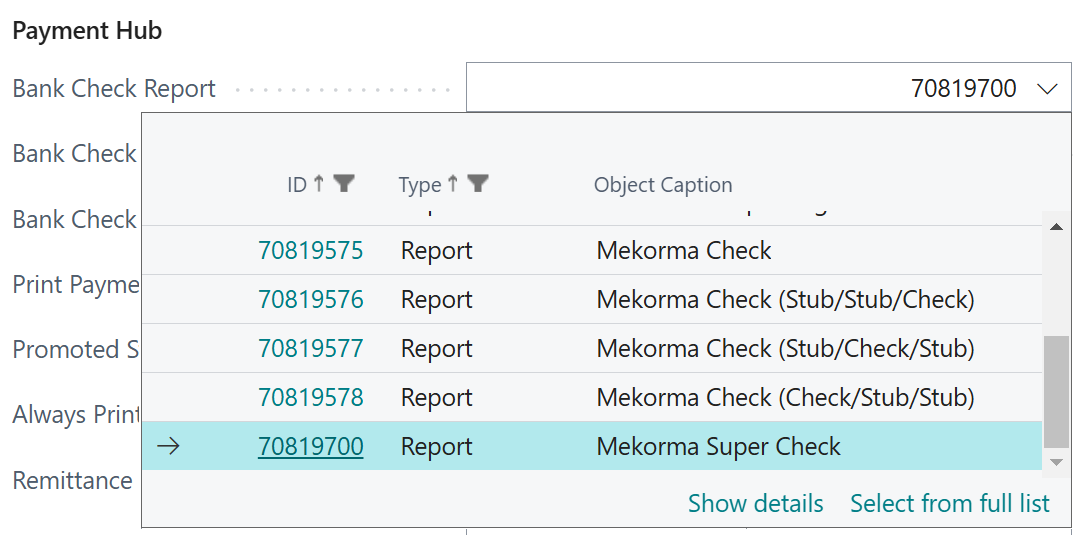
Choose the Mekorma Super Check report:
- Go to the bank account card to select or update the check report.
- Scroll to Mekorma Settings.
- Open the Bank Check Report lookup page.
- Select Mekorma Super Check.
- You are ready to select your report layout.
Last modified:
November 25, 2025
Need more help with this?
We value your input. Let us know which features you want to see in our products.