


If an invoice stub overflow is encountered on the Mekorma check report, the remittance report is automatically generated after the Mekorma check report and in the same sequence as the check report. Remittance reports are configured in the bank account card. To generate remittances after you have created a payment:
- Click the Process or Print button in the payment journal.
- After the check processes, the remittance will download to your web browser. If there is an overflow report, the report generates based on the configuration you select in the bank account card:
- If you selected Overflow Invoices, the configured number of invoices will show in the check stub and the overflow report will generate, displaying only the remaining invoices.
- If you selected All Invoices, the configured number of invoices will show in the check stub and the overflow report will generate, displaying all the invoices.
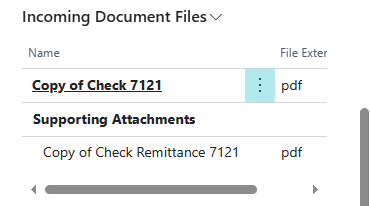
- To view the remittance copy (if enabled) after your check has processed, open the FactBox pane by clicking
![The icon that represents the FactBox.]() .
.
 .
.- Scroll down to Incoming Document Files > Supporting Attachments. A PDF copy of the remittance is attached to each payment line.

Last modified:
June 9, 2025
Need more help with this?
We value your input. Let us know which features you want to see in our products.