


With Payment Hub, you can link check reports and specific layout preferences to each bank account. This is helpful when you have multiple bank accounts that require their own check layout. Mekorma’s cross-company configurations allows check reports and check report layouts to be maintained from the Mekorma Bank Accounts page. This quick-access page shows all your bank accounts for every company in one view.
Maintain your check printing preferences for individual bank accounts from the bank account card. These preferences stay with the bank account through the payment process, eliminating the need to adjust check print settings during the payment lifecycle. When necessary, the settings can be adjusted at the time of check printing.
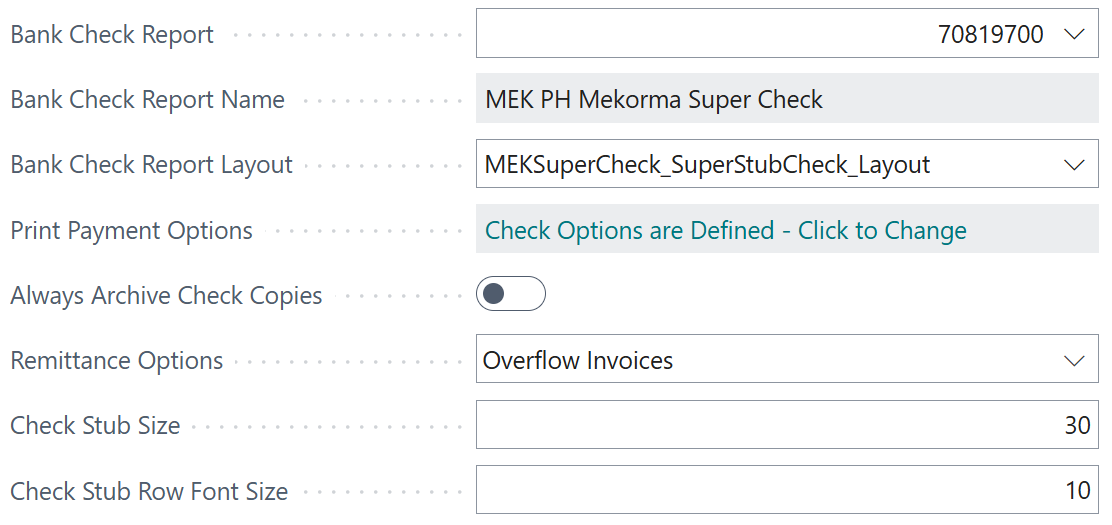
Defining bank check reports
Bank check reports are the reports Business Central uses to specify how a check will look when you print it. The terms are defined as:
- Bank Check Report: The ID number associated with the check report.
- Bank Check Report Name: The display name of the specific bank check report selected.
- Bank Check Report Layout: The specific layout for the bank check report selected. You can have multiple layouts for each bank check report, use this field to select the specific layout.
The following topics provide detailed information on check reports:
- Select your check report: How to pick the correct report for your bank account.
- Select your check report layout: Choosing layouts, including Mekorma Super Check and custom ones.
- Adjust stub sizes: Change font and invoice line counts on stubs.
- Multi-entity check reports: Using reports with Multi-Entity Management (MEM).
- Electronic Signatures check reports: Using check reports for Electronic Signatures
Note: This does not facilitate the creation of customized checks. It allows you to customize your bank account preferences and manage previously created check report layouts.
Need more help with this?
We value your input. Let us know which features you want to see in our products.