


The Process Payments page shows all your payments available for processing, including those that have errors or are pending approval.
Transactions are processed at the batch and bank account level, so if you have multiple lines in a batch using different bank accounts, they will be grouped under separate batch and bank account entries. Click the company name for a given batch line to drill into that batch to review further detail of that batch.
If you are using Mekorma’s Payment Hub Shared Services Multi-Entity solution, Action Board ensures that in a batch with multiple different line entities, each batch/line entity combination appears as a separate line to print.
To process payments in Action Board:
- Go to Action Board.
- Select Process Payments from the Action menu to see all batches ready to be processed.
- Mark the batches you want to process.
Note: Action Board currently only processes batches with payment type of Computer Check.
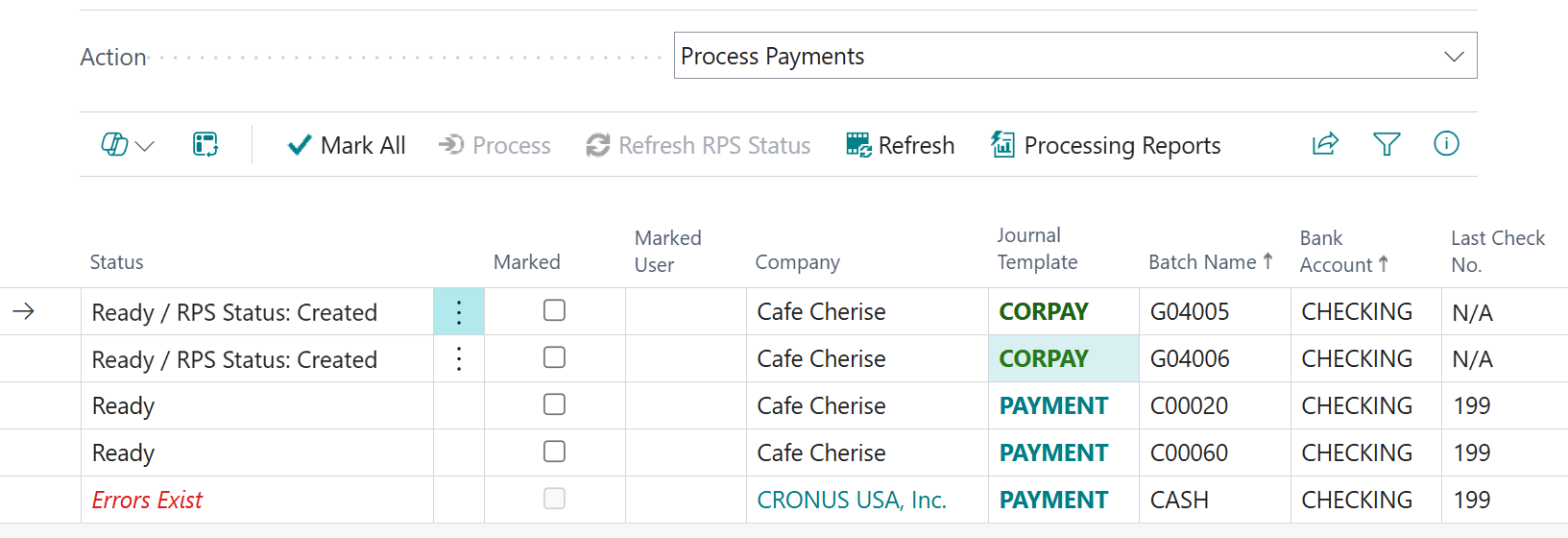
- Click Process.
- Your transactions are processed in the manner you selected.
- If you are using email print, they will be sent to the designated email address.
- If you are using universal print, they will print to the designated printer(s).
- If you are printing checks with MEM enabled, those checks print with the information you have attributed to your entity.
Note: Reprinting checks isn’t supported in Action Board. To reprint checks, follow standard Business Central processing steps.
Review Action Board processing
To review information related to processing payments, click the info icon to open the Action Board Journal Check.
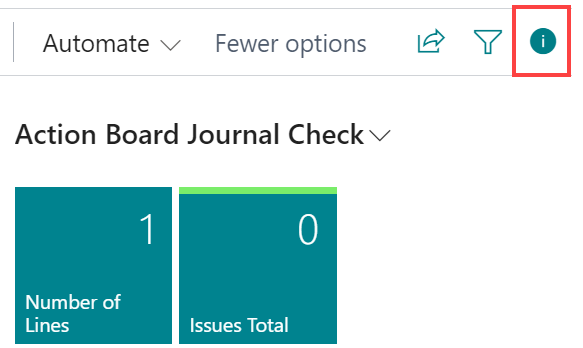
- Review any issues by clicking Issues Total. A list page opens indicating any errors or validation issues with the respective batch.
- To view the batch details, click Number of Lines. This opens the Payment Journal in a new browser tab, with the batch pre-populated. The tab will be logged into the company where the batch exists.
- Make any corrections or complete any processes to the batch as is required to allow the batch to process.
Need more help with this?
We value your input. Let us know which features you want to see in our products.