


Payment Hub allows you to create copies of checks and remittances. When enabled, each copy automatically:
- Saves as a PDF
- Includes a void watermark
- Removes the MICR line
Check copy settings are applied to each bank account, while watermarks are applied across your entire system.
Enabling check copies
Enabling and disabling check copies is managed in the Mekorma Settings of the bank account card.
The Always Archive Check Copies toggle enables and disables check copies. When check copies are enabled via the bank account card:
- A check copy is created for every payment.
- The check copy is saved to every payment line.
- Check copies cannot be disabled for individual payments.
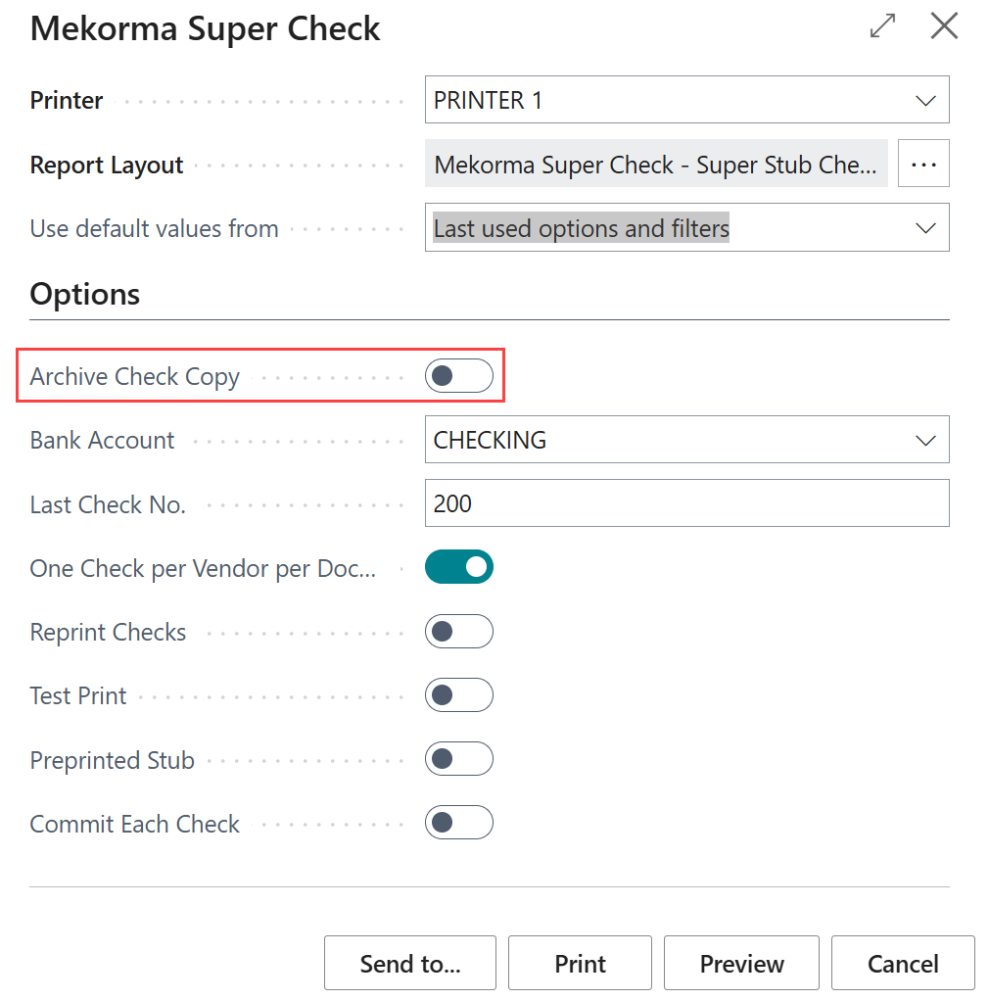
You can also enable check copies for individual payments only when needed.
- Ensure check copies are disabled in the bank account card.
- Open a payment that is ready to process.
- Open the check parameters.
- Toggle Archive Check Copy. Note: When check copies are enabled in the bank account card, this field is noneditable.
Adding a watermark
Check copies come with a standard ‘VOID’ watermark attached. If you want to add your own watermark from your files:
- Go to Mekorma Configuration.
- In the Check Printing section, click the watermark image to open the File Explorer.
- Select the watermark of your choice.
- To reset to the default watermark, click Payment Hub > Default Check Copy Watermark Image.
See Generating Check Copies for more information about how check copies are used in the payment process.
Need more help with this?
We value your input. Let us know which features you want to see in our products.