


Process reports provide detailed information about Action Board and scheduled processing runs. Use process reports to review processing activity, confirm completed actions, and troubleshoot skipped or unprocessed batches.
Process reports generate for both manual and scheduled Action Board runs at the time of processing. Each time an action is run, a process report is generated.
Navigation
There are multiple ways to view a process report:
- Mekorma Process Reports: This page lists all available process reports. Open a specific report by clicking the name in the Action column.
- Directly in Action Board: After processing completes, the interface refreshes and displays a link to the report. You can also click Processing Reports in the Action Board menu.
- Job Queue Entries: In a job queue entry for a scheduled Action Board run, click Actions > Job Queue > Mekorma Process Reports.
Understand the report
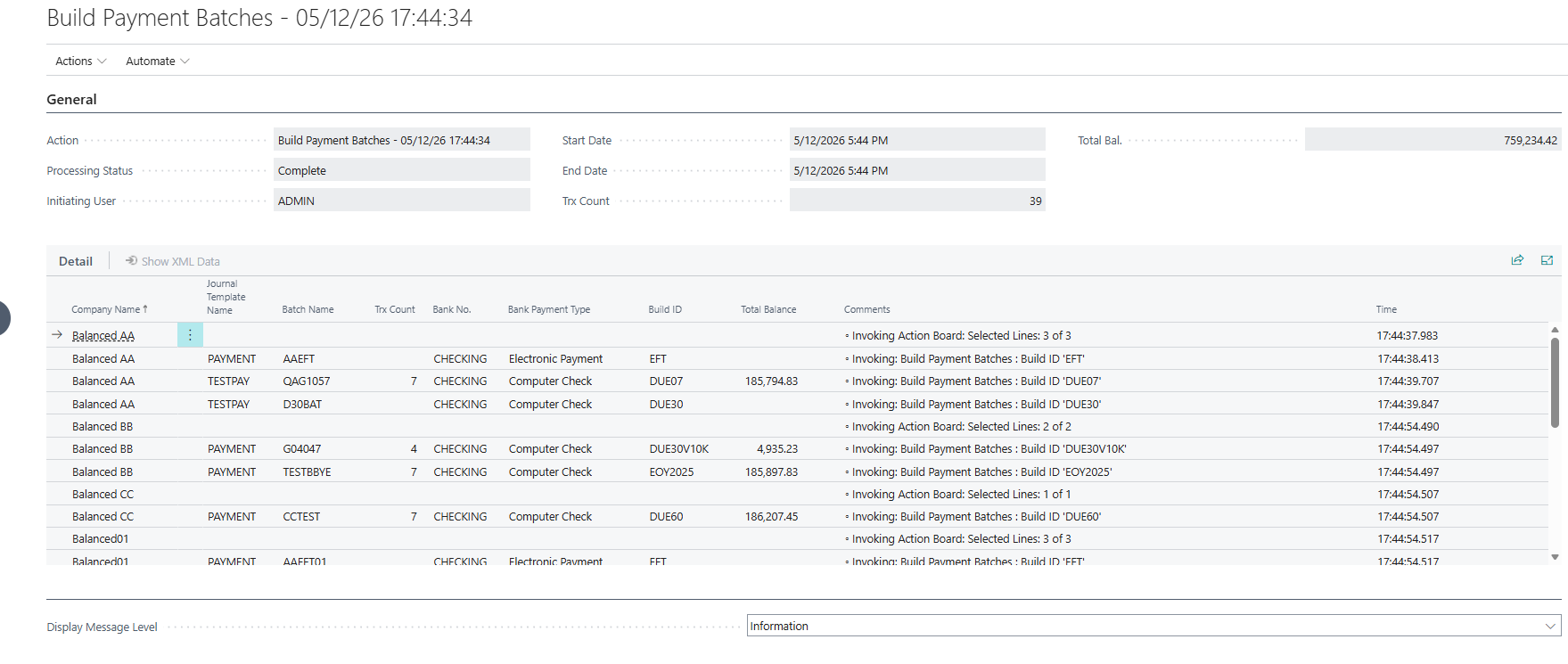
Each row in the process report represents a different step completed during the Action Board run. Review the Comments column to understand what actions were processed, skipped, or exported during the run.
The Comments column can help you determine whether batches were successfully processed or skipped. For example, a message such as “Selected lines: 2 of 2” indicates that two eligible batches were found and both were processed.
A message such as “Selected lines: 0 of 2” indicates that batches were found, but none were selected for processing. This can occur when batches are not ready for processing, such as pending approval, previously processed payments, or too restrictive batch number patterns in the Scheduled Action. In these scenarios, review the batch manually to determine why it was skipped.
The Trx Count and Balance columns help confirm whether batches completed successfully.
- If Trx Count and Balance values are present, the batch completed processing successfully.
- If Trx Count and Balance values are blank, the batch was either skipped or did not complete processing successfully.
Comments column messages
The Comments column records processing activity for each step of the Action Board run.
Common messages include:
- Invoking: Build Payment Batches → The payment batch build process started.
- Invoking: Process Payments → Payment processing started.
- Invoking: Post Batch → Batch posting started.
- ! → Indicates an error occurred during processing.
When an error occurs, the process stops for that company and the remaining actions may not complete. All other companies being processed will continue.
Report details
Process reports record the following information from an Action Board run:
| Action | Processing Status |
| Initiating user | Timestamp |
| Transaction count | Balance |
| Company name | Journal template |
| Batch name | Bank account |
| Payment type | Build ID |
| Comments |
You can change the level of information shared in the report by selecting a different option from the Display Message Level dropdown. Information is the default setting. Verbose is recommended only for troubleshooting scenarios. Select errors to only see where issues occurred.
Process reports can be exported and shared with Support for troubleshooting purposes. Exported process reports do not contain sensitive payment information.
Need more help with this?
We value your input. Let us know which features you want to see in our products.