


A check remittance lists the invoices included in a payment. When processing check payments, it’s important to configure how remittances and overflows are handled to ensure accurate and complete payment reporting. Ensure your selected check report layouts are compatible with your remittance settings. For example, if you’re using the three checks per page layout, set your remittance options to All Invoices to ensure that a full remittance prints correctly with that layout.
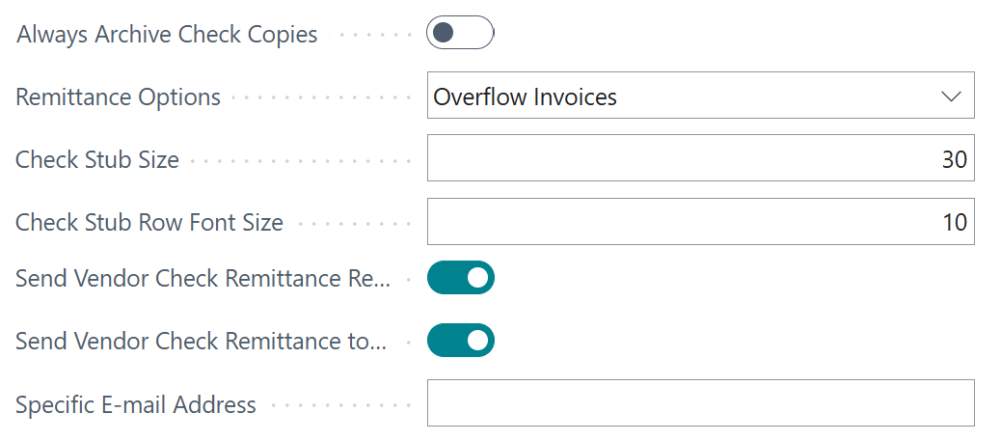
The options below allow you to tailor remittance printing and distribution based on your needs. These settings are adjusted in the Mekorma Settings of each bank account card:
- Remittance Options: Establish when you want remittance reports to print.
- Overflow Invoices: In an overflow scenario, only the invoices that couldn’t fit on the stub are included on the remittance report.
- All Invoices: All invoices for a particular check payment are included on the remittance report.
- Send Vendor Check Remittance Report: Email the remittance report directly to the vendor for whom the check is being created. By default it sends to the email address on the vendor card. See Set up email – Business Central | Microsoft Learn for more information on adding an email address to a vendor.
- Send Vendor Check Remittance to Specific Email Address: Email the remittance report to a specific address. When this is enabled, the Specific E-mail Address field displays and you can enter the email address to send remittance reports to.
- When check copies are enabled, a copy of the remittance report will be included as an attachment to the payment line.
Note: Stub size and font size do not affect remittance reports (these follow standard Business Central report formatting).
Additional resources
Mekorma Super Check report layouts – Learn which layouts are compatible with remittance overflow settings.
Check copies are enabled – Learn how to enable check copies.
Stub size and font size – Learn about resizing your check stubs.
Set up email – Business Central | Microsoft Learn – Instructions for configuring vendor email addresses.
Report and document layouts overview – Business Central | Microsoft Learn – Learn how to edit and customize report layouts.
Need more help with this?
We value your input. Let us know which features you want to see in our products.